
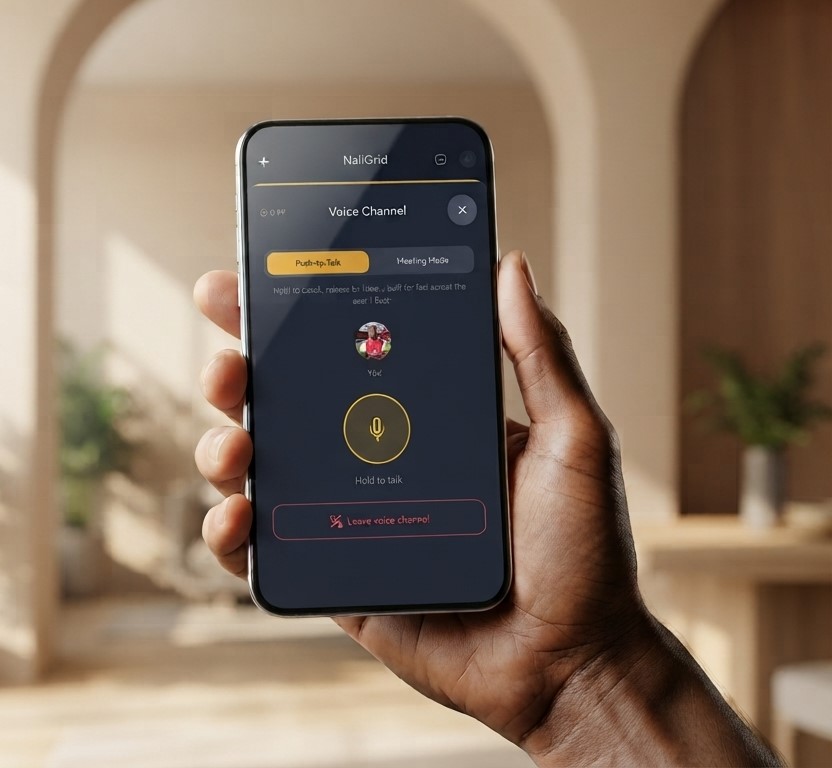
Voice Channel
A built-in walkie-talkie for your event team. Push-to-Talk for fast floor coordination, Meeting Mode for planning calls — no separate app, no hardware.
No more walkie-talkie chaos.
Hold to talk on the event floor, or open a full Meeting Mode call for pre-event briefings — your whole team, one channel, zero extra apps.
Push-to-Talk
Hold the mic button to talk, release to listen — built for fast calls across the event floor.
Meeting Mode
Tap to open your mic like a normal call — built for pre-event briefings and planning calls.
Live Speaking Indicators
See exactly who’s talking in real time, with a pulsing ring around their avatar.
Coordinate Your Team Without Leaving the App
Replace scattered WhatsApp voice notes and separate walkie-talkie apps with one channel built into your event workspace.
Instant Floor Coordination
Hold to talk and reach your entire team at once — faster than typing a message or waiting for a WhatsApp voice note to upload.
Two Modes, One Channel
Switch between Push-to-Talk for the event floor and Meeting Mode for open-mic planning calls — everyone can join the same channel regardless of which mode they’re using.
Cost-Aware By Design
A visible session timer and automatic 15-minute idle disconnect keep call time — and cost — under control, even during long pre-event planning sessions.
"Using NaliGrid has been a game-changer for me. It has helped me curate my operations and finances. I wholeheartedly recommend this to anyone who wants a hassle-free, seamless operation."

Built for Real Event-Day Conditions
A voice channel that works the way event teams actually communicate — on the floor and in planning.
Push-to-Talk
Hold the mic button to talk, release to listen — a single, deliberate press instead of an always-open line.
Meeting Mode
Tap once to open your mic like a normal call, tap again to mute — built for pre-event briefings and planning calls, not just the event floor.
Live Session Timer
See exactly how long you’ve been connected, right in the channel — since call time is what gets billed.
Persistent Notification
A persistent notification confirms you’re connected, with a single vibration on join instead of a repeated buzz while you talk.
Frequently Asked Questions
Common questions about this feature.
Voice Channel

Ready to cut the WhatsApp chaos?
Open the Voice Channel from any live event and coordinate your team in real time — no extra app required.